

Billing & Plans
Contentrain Studio uses an open core model. The AGPL-licensed core is a fully functional product, and paid plans unlock additional features and higher usage limits. Billing is per-workspace and runs through the configured payment provider — Polar by default, with Stripe also supported.
Editions vs. plans
Plan tiers (free / starter / pro / enterprise) apply to the managed service. A self-hosted Community Edition deployment runs the AGPL core only: it resolves to the fixed community tier, has no billing UI, leaves numeric limits unenforced, and hides Enterprise-only features. See Editions for the full split.
Plan Tiers
| Free | Starter | Pro | Enterprise | |
|---|---|---|---|---|
| Price | $0 | $9/mo | $49/mo | Custom |
| Seats included | 1 | 3 | 25 | Unlimited |
| AI messages/mo | 0 | 150 | 1,500 | Unlimited |
| Bring your own key (BYOA) | — | — | Yes | Yes |
| Media storage | — | 1 GB | 15 GB | 100 GB |
Free
Free is a structural workspace shell created at signup — not a usable tier on its own:
- No AI messages, no media, no project connection
- Browse the dashboard and explore the interface
- Clicking Connect Repository opens plan selection
- Start a 14-day trial on Starter or Pro to unlock the platform
Starter
Starter unlocks the full platform for solo developers and small projects (14-day free trial):
- AI agent with the full model lineup (Haiku 4.5, Sonnet 4.6, Sonnet 5, Opus 4.8) via Contentrain's Studio-hosted key — 150 messages/month
- Content CRUD — all 4 model kinds, 27 field types, multi-locale, branch review workflow
- Media upload — 1 GB storage, 5 MB max file size, 4 variants/field
- CDN delivery — 3 API keys, 2 GB bandwidth/month
- Forms — 1 form-enabled model, 100 submissions/month, CAPTCHA, auto-approve
- Outbound webhooks — up to 3
- MCP Cloud — 1 key, 5,000 calls/month
- Reviewer and Viewer roles
- Up to 3 team members
Pro
Pro scales for growing content teams. Everything in Starter, plus:
- AI agent — 1,500 messages/month on the Studio-hosted key (same full model lineup as Starter)
- BYOA — bring your own Anthropic API key
- Media — 15 GB storage, 50 MB max file size, custom variants (10/field)
- CDN — 25 API keys, 60 GB bandwidth/month, preview branches (roadmap)
- Forms — 15 form-enabled models, 3,000 submissions/month, spam filter (roadmap)
- Conversation API — 15 keys, 3,000 API messages/month, custom instructions (roadmap)
- MCP Cloud — 15 keys, 150,000 calls/month
- Outbound webhooks — up to 25
- Model-specific access control
- Up to 25 team members
Enterprise
Enterprise is for organizations with advanced requirements:
- Custom limits, effectively unlimited usage
- 100 GB media storage (or custom)
- SSO — SAML / OIDC (roadmap)
- White-label branding (roadmap)
- Custom CDN domain (roadmap)
- Dedicated support and custom pricing
Feature Comparison
Values below come from Studio's plan-feature matrix. Items marked (roadmap) are planned and not yet generally available. Most Media, CDN, Conversation API, outbound-webhook, and advanced-role capabilities are Enterprise Edition features — available on the managed service but absent from a self-hosted Community deployment.
AI & Content
| Feature | Free | Starter | Pro | Enterprise |
|---|---|---|---|---|
| AI agent | — | 150 msg/mo | 1,500 msg/mo | Unlimited (custom) |
| Bring your own API key (BYOA) | — | — | Yes | Yes |
| Studio-hosted AI key | — | Yes | Yes | Yes |
| Content CRUD | — | Yes | Yes | Yes |
| All 4 model kinds | — | Yes | Yes | Yes |
| 27 field types | — | Yes | Yes | Yes |
| Multi-locale | — | Yes | Yes | Yes |
| Branch review workflow | — | Yes | Yes | Yes |
Media (Enterprise Edition)
| Feature | Free | Starter | Pro | Enterprise |
|---|---|---|---|---|
| Media library | — | Yes | Yes | Yes |
| Upload | — | Yes | Yes | Yes |
| Storage | — | 1 GB | 15 GB | 100 GB |
| Max file size | — | 5 MB | 50 MB | 100 MB |
| Variants per field | — | 4 | 10 | Unlimited |
| Custom variants | — | — | Yes | Yes |
CDN (Enterprise Edition)
| Feature | Free | Starter | Pro | Enterprise |
|---|---|---|---|---|
| CDN delivery | — | Yes | Yes | Yes |
| API keys | 0 | 3 | 25 | Unlimited |
| Bandwidth | 0 | 2 GB/mo | 60 GB/mo | Unlimited |
| Preview branches (roadmap) | — | — | Yes | Yes |
| Custom domain (roadmap) | — | — | — | Yes |
Forms
| Feature | Free | Starter | Pro | Enterprise |
|---|---|---|---|---|
| Form-enabled models | 0 | 1 | 15 | Unlimited |
| Submissions/month | 0 | 100 | 3,000 | Unlimited |
| CAPTCHA (Turnstile) | — | Yes | Yes | Yes |
| Auto-approve | — | Yes | Yes | Yes |
| Webhook notification (EE) | — | Yes | Yes | Yes |
| File upload (EE, roadmap) | — | Yes | Yes | Yes |
| Spam filter (EE, roadmap) | — | — | Yes | Yes |
API & Integrations
| Feature | Free | Starter | Pro | Enterprise |
|---|---|---|---|---|
| MCP Cloud | — | Yes | Yes | Yes |
| MCP Cloud keys | 0 | 1 | 15 | Unlimited |
| MCP Cloud calls/month | 0 | 5,000 | 150,000 | Unlimited |
| Remote MCP (OAuth) | — | Yes | Yes | Yes |
| Conversation API (EE) | — | — | Yes | Yes |
| Conversation API keys | 0 | 0 | 15 | Unlimited |
| API messages/month | 0 | 100 | 3,000 | Unlimited |
| Outbound webhooks (EE) | 0 | 3 | 25 | Unlimited |
| Custom instructions (EE, roadmap) | — | — | Yes | Yes |
Team & Security
| Feature | Free | Starter | Pro | Enterprise |
|---|---|---|---|---|
| Team members | 1 | 3 | 25 | Unlimited |
| Reviewer role (EE) | — | Yes | Yes | Yes |
| Viewer role (EE) | — | Yes | Yes | Yes |
| Model-specific access (EE) | — | — | Yes | Yes |
| SSO — SAML / OIDC (EE, roadmap) | — | — | — | Yes |
| White-label (EE, roadmap) | — | — | — | Yes |
Usage & Overage
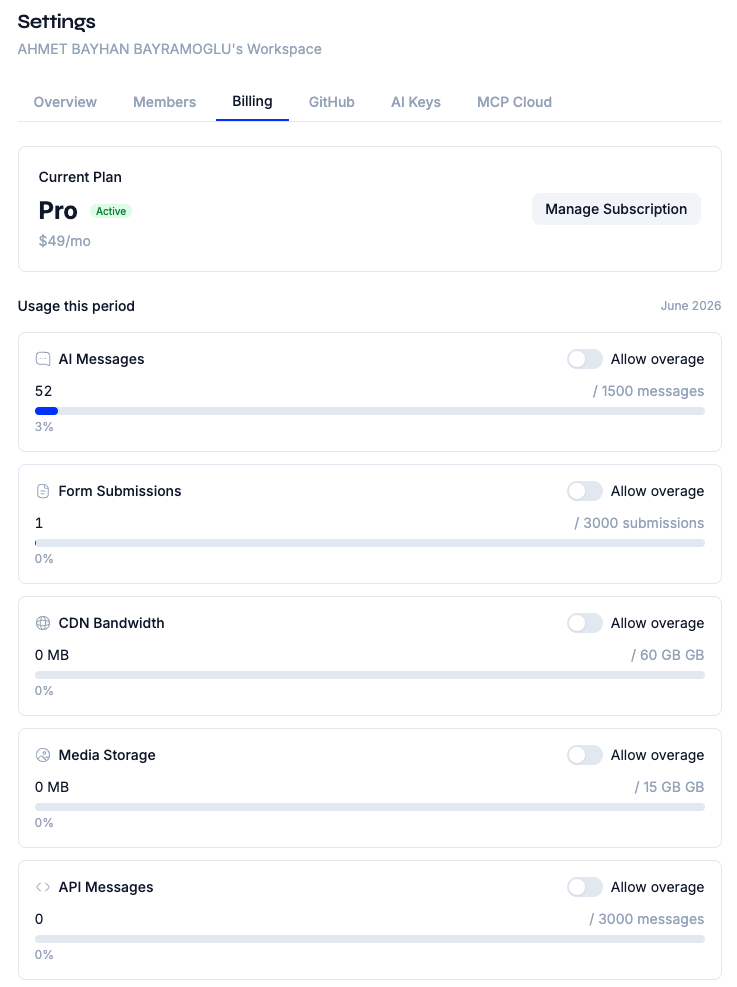
Metered limits reset monthly. On Pro and above you can opt in to overage in Workspace Settings → Billing so that work continues past the included quota at metered rates instead of being blocked:
| Metered resource | Overage rate |
|---|---|
| AI messages | $0.03 / message |
| API messages (Conversation API) | $0.05 / message |
| MCP Cloud calls | $0.005 / call |
| CDN bandwidth | $0.10 / GB |
| Form submissions | $0.01 / submission |
| Media storage | $0.25 / GB / month |
With overage disabled, requests beyond the included quota are rejected until the next monthly reset or a plan upgrade.
Payment & Subscriptions
Plan upgrades, subscription management, and invoicing run through the configured payment provider (Polar by default; Stripe supported).
Starting a Subscription
- Navigate to Workspace Settings → Billing
- Click Upgrade next to the plan you want
- You are redirected to the provider's hosted checkout
- Complete the payment form
- After successful payment, you are redirected back to Studio
- Your workspace plan is updated automatically via a billing webhook
Trial Period
Starter and Pro include a 14-day free trial. During the trial:
- You have full access to all features of the selected plan
- No payment is charged until the trial ends
- You can cancel before the trial ends to avoid charges
- A trial countdown shows remaining days in the billing panel
Managing Your Subscription
Click Manage subscription in the billing panel to open the provider's customer portal, where you can:
- Update payment methods
- View invoices and payment history
- Change your plan (upgrade or downgrade)
- Cancel your subscription
Billing States
Your workspace can be in one of these billing states:
| State | Meaning | Access |
|---|---|---|
free | No subscription, Free shell | Free-tier only (no platform access) |
trial_active | Trial period in progress | Full plan features |
trial_expired | Trial ended without subscribing | Locked — upgrade required |
subscribed | Active paid subscription | Full plan features |
past_due | Payment failed, grace period active | Full features during grace |
grace_expired | Grace period ended | Locked — update payment |
canceled | Subscription canceled, period remaining | Full features until period end |
canceled_expired | Paid period ended after cancellation | Locked (402) — resubscribe required |
Locked States
When a workspace enters a locked state (trial_expired, grace_expired, canceled_expired), paid features are disabled:
- Existing content stays readable, and you can always export your data
- To restore full access, upgrade or update your payment method
TIP
Studio never deletes your content when a subscription lapses. Your content lives in your Git repository, and you always retain access to it.
Self-Hosted & Community Edition
A self-hosted Community Edition deployment has no managed billing:
- All workspaces resolve to the fixed
communitytier - Numeric limits are unenforced (you run your own infrastructure)
- Enterprise-only features (Media, CDN, outbound webhooks, Conversation API, advanced roles) are hidden
- AI uses your own Anthropic API key
- No billing UI is shown; plan enforcement still routes through the same
hasFeature()/getPlanLimit()system
See Self-Hosting and Enterprise Edition for details.
Upgrading and Downgrading
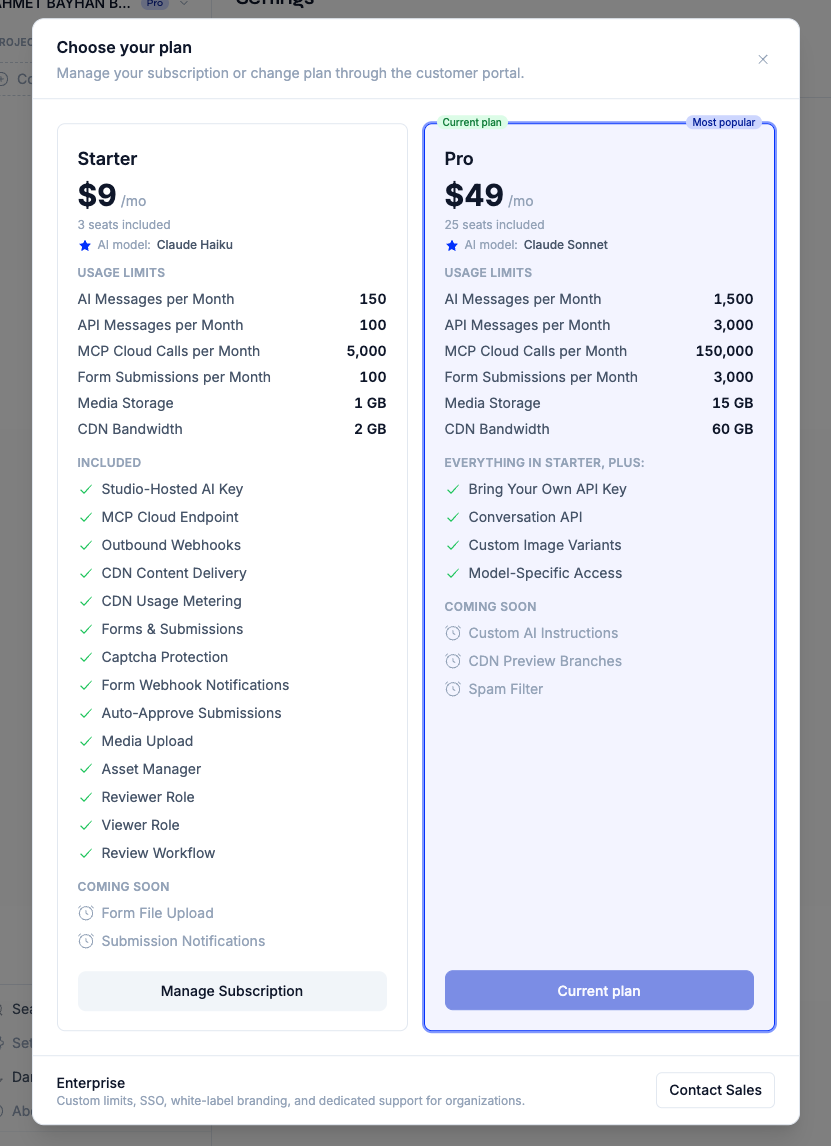
Upgrading
- Navigate to Workspace Settings → Billing
- Click Upgrade on the desired plan
- Complete hosted checkout
- Features are available immediately after payment
Downgrading
- Open the customer portal via Manage subscription
- Select a lower plan
- Changes take effect at the end of the current billing period
- Features above the new plan's limits become unavailable
WARNING
When downgrading, ensure you are within the lower plan's limits (team members, API keys, form models, etc.). Excess items are not automatically removed but may become inaccessible.
Next Steps
- Workspaces — Understand workspace-level billing
- Team Management — Manage seats within your plan
- AI Chat — Understand AI message limits and model tiers