

Webhooks
Webhooks let you receive real-time HTTP notifications when events occur in your project. Configure a webhook URL and select which events to listen for — Studio will POST a signed payload to your endpoint whenever a matching event fires.
Managed service / Enterprise Edition
Outbound webhooks are an Enterprise Edition feature, gated by the api.webhooks_outbound plan feature. They are available on Contentrain's managed service (Starter plans and above) and on self-hosted Enterprise Edition deployments. They are not available in the self-hosted Community Edition.
Creating a Webhook
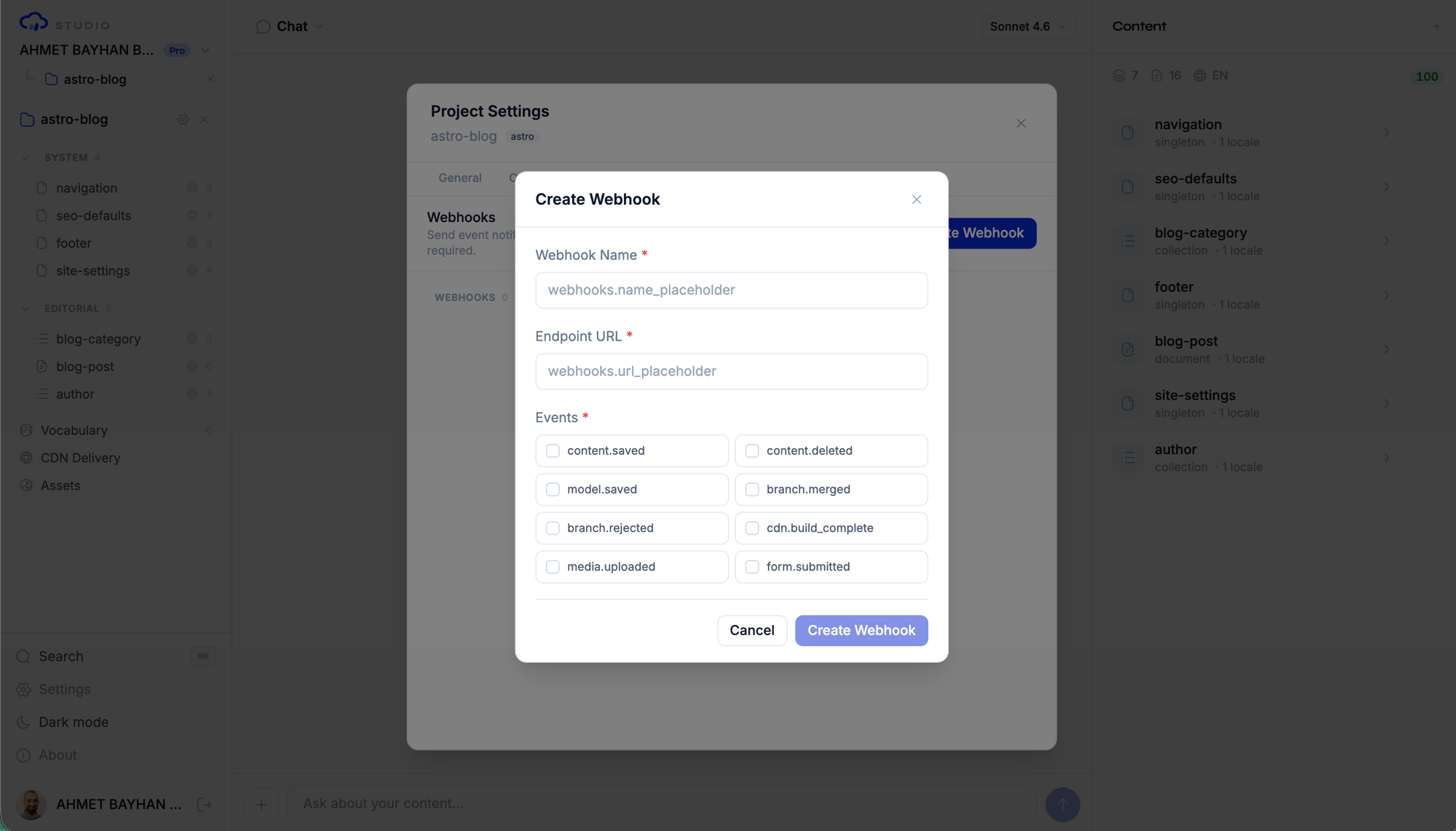
- Open the project settings and go to the Webhooks tab
- Click Create webhook
- Enter the webhook URL (must be HTTPS for production)
- Select the events you want to subscribe to
- A webhook secret is generated automatically for signature verification
WARNING
Webhook URLs must point to public endpoints. Studio blocks requests to private networks (RFC 1918), localhost, link-local addresses, and cloud metadata endpoints for SSRF protection.
Event Types
Studio supports thirteen webhook event types:
| Event | Fires When |
|---|---|
content.saved | A content entry is created or updated |
content.deleted | A content entry is deleted |
model.saved | A content model is created or updated |
branch.merged | A review branch is merged to main |
branch.rejected | A review branch is rejected (deleted) |
branch.changes_requested | A reviewer requests changes on a review branch |
cdn.build_complete | A CDN build finishes successfully |
media.uploaded | A media asset is uploaded |
form.submitted | A public form submission is received |
comment.submitted | A visitor submits a comment |
comment.approved | A comment is approved |
deploy.triggered | A deploy hook is triggered |
schedule.fired | A scheduled run fires |
Event Payload Format
All webhook payloads follow the same structure:
{
  "event": "content.saved",
  "projectId": "project-uuid",
  "timestamp": "2026-04-02T10:30:00.000Z",
  "data": {
    "models": ["blog-posts"],
    "locale": "en",
    "source": "api"
  }
}
The envelope is always { event, projectId, timestamp, data }. The data field varies by event type and contains event-specific information. Most events include a source field (api, conversation, etc.) indicating how the change was made.
Event-Specific Data
content.saved:
{
  "models": ["blog-posts"],
  "locale": "en",
  "source": "api"
}content.deleted:
{
  "models": ["blog-posts"],
  "locale": "en",
  "entryIds": ["a1b2c3d4e5f6", "g7h8i9j0k1l2"],
  "source": "conversation"
}model.saved:
{
  "modelId": "blog-posts",
  "source": "api"
}branch.merged:
{
  "branch": "cr/content/blog-posts/en/1774800862-27c1",
  "source": "api"
}cdn.build_complete:
{
  "buildId": "build-uuid",
  "status": "success",
  "filesUploaded": 15,
  "durationMs": 3200,
  "error": null
}media.uploaded:
{
  "assetId": "asset-uuid",
  "filename": "hero-banner.webp",
  "contentType": "image/webp"
}form.submitted:
{
  "submissionId": "submission-uuid",
  "modelId": "contact-form",
  "status": "pending"
}
Webhook Security
HMAC-SHA256 Signatures
Every webhook delivery includes a signature in the X-Contentrain-Signature header. The signature is an HMAC-SHA256 hash of the request body using your webhook secret.
To verify a webhook delivery:
import { createHmac, timingSafeEqual } from 'crypto'

function verifyWebhook(body, signature, secret) {
  const expected = createHmac('sha256', secret)
    .update(body)
    .digest('hex')

  return timingSafeEqual(
    Buffer.from(expected),
    Buffer.from(signature)
  )
}
WARNING
Always verify webhook signatures before processing the payload. Use timing-safe comparison to prevent timing attacks.
SSRF Protection
Studio validates webhook URLs to prevent Server-Side Request Forgery:
- Blocked:
localhost,127.0.0.0/8,10.0.0.0/8,172.16.0.0/12,192.168.0.0/16,169.254.0.0/16,::1, cloud metadata endpoints - Required:
http://orhttps://protocol - Recommended: Use HTTPS in production
Test Delivery
You can send a test delivery to verify your webhook configuration:
- Open the webhook in settings
- Click Test
- Studio sends a test payload to your endpoint
- View the delivery result (status code, response time)
Delivery Logs
Every webhook delivery is logged. View the delivery history to see:
| Field | Description |
|---|---|
| Event type | Which event triggered the delivery |
| Status code | HTTP response code from your endpoint |
| Response time | How long the delivery took |
| Timestamp | When the delivery was attempted |
| Payload | The data that was sent |
Retry Behavior
If a webhook delivery fails (non-2xx response or timeout), Studio retries with exponential backoff:
| Attempt | Delay |
|---|---|
| 1 | Immediate |
| 2 | 1 minute |
| 3 | 5 minutes |
| 4 | 30 minutes |
| 5 | 2 hours |
| 6 | 12 hours |
After 5 failed retries, the delivery is marked as permanently failed. You can view failed deliveries in the delivery logs.
TIP
Ensure your webhook endpoint responds quickly (under 10 seconds) with a 2xx status code. Return 200 OK as soon as you receive the payload, then process it asynchronously.
Managing Webhooks
Editing a Webhook
You can update a webhook's URL, events, or active status:
- Open webhook settings
- Click on the webhook to edit
- Modify the URL or event subscriptions
- Save changes
Deleting a Webhook
To remove a webhook:
- Open webhook settings
- Click the delete button on the webhook
- Confirm the deletion
Deleting a webhook stops all future deliveries immediately.
Plan Limits
| Feature | Free | Starter | Pro | Enterprise |
|---|---|---|---|---|
| Outbound webhooks | 0 | 3 | 10 | Unlimited |
Use Cases
| Scenario | Events | Action |
|---|---|---|
| Rebuild static site | branch.merged | Trigger CI/CD pipeline |
| Notify Slack on new content | content.saved | Post to Slack channel |
| Invalidate CDN cache | cdn.build_complete | Purge cache keys |
| Process form submissions | form.submitted | Send to CRM or email |
| Sync search index | content.saved, content.deleted | Update Algolia/Typesense |
| Audit trail | All events | Log to monitoring service |
Next Steps
- CDN — Deliver content through the built-in CDN
- Forms — Accept and manage form submissions
- Conversation API — Programmatic content management