

CDN
Contentrain Studio includes a built-in Content Delivery Network for serving your published content through a fast, public API. The CDN builds optimized content from your Git repository and serves it through edge infrastructure.
Managed service / Enterprise Edition
The CDN is an Enterprise Edition feature, gated by the cdn.delivery plan feature and backed by Cloudflare R2 storage. It is available on Contentrain's managed service (Starter plans and above) and on self-hosted Enterprise Edition deployments. It is not available in the self-hosted Community Edition, which has no CDN storage backend.
How the CDN Works
Git Repository → Build Pipeline → CDN Storage → Public API- Content is committed to your repository through Studio
- A build is triggered (manually or automatically after a merge)
- The build pipeline reads content, filters by status (
publishedonly), and serializes to optimized JSON - Content is uploaded to CDN storage
- Consumers fetch content through the public delivery endpoint
Enabling CDN
CDN is available on Starter plans and above. To enable it for a project:
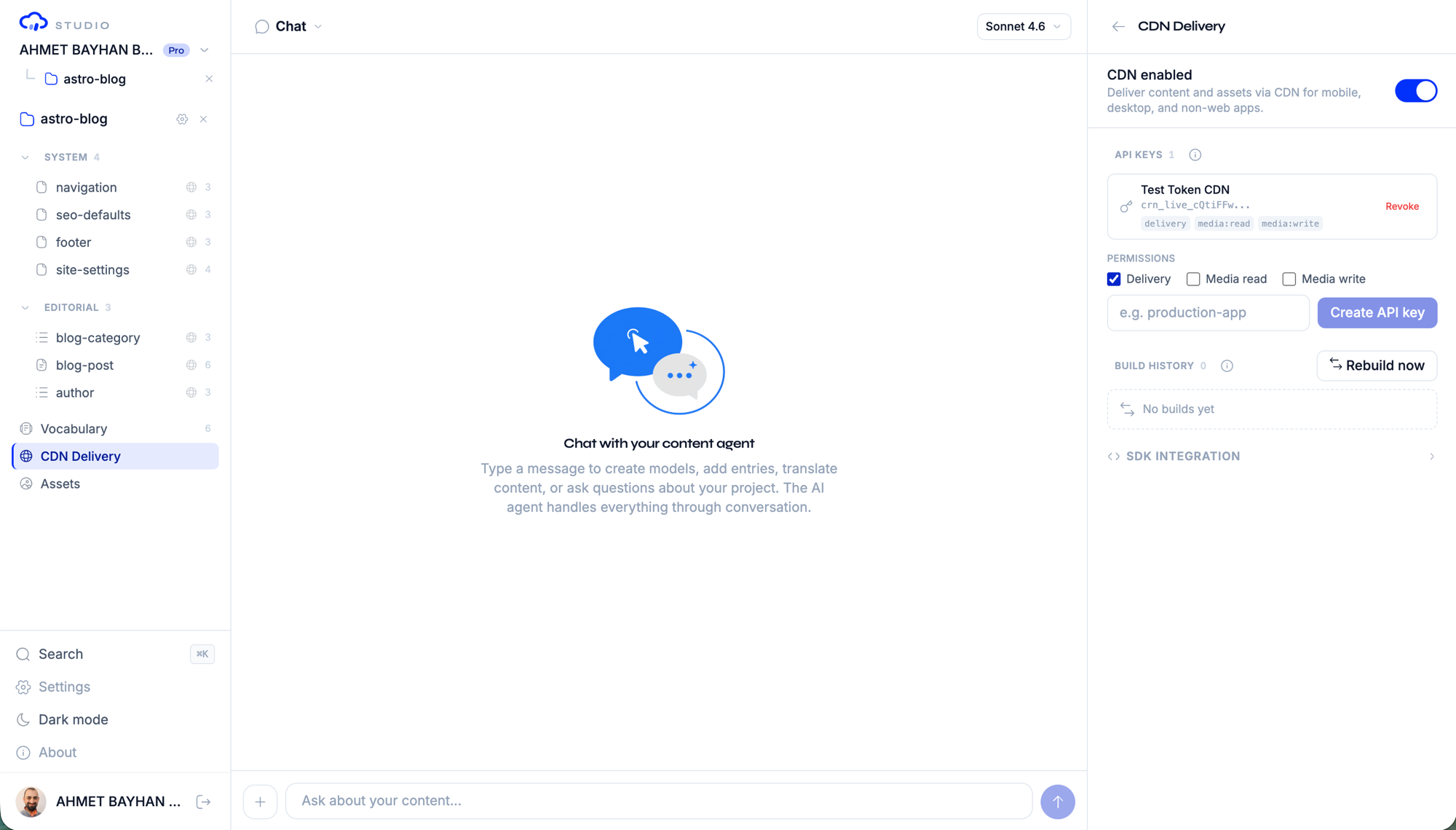
- Open the project sidebar
- Click CDN to open the CDN panel
- Toggle Enable CDN in the settings
- Create an API key for authentication
API Key Management
CDN access requires an API key. Keys are used in the Authorization header of requests to the delivery endpoint.
Creating a Key
- In the CDN panel, navigate to the Keys section
- Click Create key
- Enter a descriptive name for the key
- The key is generated and shown once — copy it immediately
WARNING
API keys are shown only once at creation time. Studio stores only the SHA-256 hash of the key. If you lose the key, you must create a new one.
Key Format
CDN API keys follow the format:
crn_live_{random-base62-string}Example: crn_live_7K2mX9pQ4rT6vW3nY8sB1hJ5
Deleting a Key
To revoke access, delete the key from the CDN panel. This takes effect immediately — any requests using the deleted key will receive a 401 Unauthorized response.
Public Delivery Endpoint
Content is served through a REST-style endpoint:
GET /api/cdn/v1/{projectId}/{path}
Authorization: Bearer crn_live_...
Path Structure
Objects are keyed by model ID (the domain is not part of the CDN path — it is written flat by the build pipeline):
| Path | Returns |
|---|---|
content/{modelId}/{locale}.json | Published entries for an i18n collection/singleton/dictionary, by locale |
content/{modelId}/data.json | Published entries for a non-i18n model |
meta/{modelId}/{locale}.json | Per-entry metadata for an i18n model, by locale (data.json for non-i18n) |
documents/{modelId}/{slug}/{locale}.json | A single document entry ({ frontmatter, body, html }) |
documents/{modelId}/_index/{locale}.json | Frontmatter index for a document model, by locale |
models/{modelId}.json | A model definition |
models/_index.json | Summary index of all models |
_manifest.json | Build manifest (commit SHA, locales, domains, model list) |
_media_manifest.json | Media manifest — asset metadata (dimensions, blurhash, alt text) |
_bundle/{locale}.json | Per-locale bundle — all JSON content for one locale in a single fetch (see Locale bundles) |
media/{...} | Media binaries (images, files) — served keyless when public media is enabled |
For example, the English entries of a blog-post collection are served at content/blog-post/en.json.
Response Format
The endpoint returns the raw published-content JSON file straight from CDN storage, with Content-Type: application/json and an ETag header (conditional If-None-Match requests return 304). Collection and singleton files are an object map keyed by entry ID, containing only entries with published status:
{
  "a1b2c3d4e5f6": {
    "title": "Hello World",
    "slug": "hello-world",
    "body": "..."
  },
  "g7h8i9j0k1l2": {
    "title": "Second Post",
    "slug": "second-post",
    "body": "..."
  }
}
Delivery Model
The delivery endpoint is built for the hot path. Key, project, and plan lookups are served from in-process TTL caches, so a warm request spends its round-trips only on the rate-limit check and the storage read. Storage reads are conditional: the endpoint forwards your If-None-Match to R2, so an unchanged object returns 304 with no body transfer.
Cache-Control is split by auth mode:
- Keyed content (JSON, manifests) is returned as
private, max-age=60— a shared or edge cache must never replay keyed content to a keyless client. - Keyless public media is returned as
public, max-age=60, s-maxage=3600, stale-while-revalidate=86400, so shared caches and CDNs can serve it.
Locale bundles
Every build also emits one bundle artifact per locale at _bundle/{locale}.json. A bundle packs all of a locale's JSON content into a single object so a client can prime its per-path cache with one conditional fetch instead of one request per model (plus one per include() relation). Content only changes on a build, so shipping the bodies together turns a 5–10+ round-trip page render into a single request.
{
  "version": "1",
  "commitSha": "abc123...",
  "builtAt": "2026-07-10T12:00:00.000Z",
  "locale": "en",
  "paths": {
    "content/authors/en.json": { "a1b2c3d4e5f6": { "name": "Jane" } },
    "content/site-settings/data.json": { "title": "My Site" },
    "documents/articles/_index/en.json": []
  }
}pathsis keyed by the exact delivery paths the SDK already fetches, and each body is identical to the standalone artifact — one primed fetch serves every listed path from cache.- All JSON-kind models ship their full body (collections published-filtered, singletons, dictionaries). Non-i18n models appear under their real
content/{modelId}/data.jsonpath in every locale bundle. - Document models contribute only their
_index; per-slug document bodies andmeta/...are not bundled and fall through to normal per-path fetches. - The bundle is emitted on every build so it always mirrors the standalone artifacts. Consumers must ignore a bundle whose
versionis not"1"(or whosepathsis missing) and fall back to per-path fetches. Like every delivery object, it is ETag'd and keyed-only (never publicly served).
Authentication
Content JSON and manifests always require a valid API key in the Authorization header:
curl -H "Authorization: Bearer crn_live_..." \
  https://your-studio.com/api/cdn/v1/{projectId}/content/blog-post/en.json
Media binaries (paths starting with media/) are the one exception: when a project has public media enabled, they are served keyless (rate-limited per project + client IP) so a browser <img src> can load them — an API key can't live in an <img> tag. A project that has not enabled public media requires a key for media too.
Build Pipeline
Triggering a Build
Builds can be triggered in two ways:
- Manual trigger — Click Trigger Build in the CDN panel
- Automatic — After a branch merge completes (when configured)
Build Process
Each build:
- Reads the latest content from your Git repository
- Loads all model definitions
- Filters content entries to include only
publishedstatus - Serializes Markdown content to HTML (for document models)
- Uploads optimized JSON to CDN storage
- Cleans up stale files from previous builds
Build Results
After a build completes, you can see:
| Field | Description |
|---|---|
buildId | Unique build identifier |
commitSha | The Git commit the build was created from |
filesUploaded | Number of content files processed |
filesDeleted | Number of stale files removed |
totalSizeBytes | Total size of the uploaded content |
changedModels | Which models had content changes |
durationMs | Build duration in milliseconds |
Build History
The CDN panel shows a history of recent builds with their status, timing, and output details.
TIP
If content looks stale on the CDN, trigger a manual build to ensure the latest published content is served.
CDN Security
- API key authentication — Content JSON and manifests require a valid key on every request. Media binaries are the only content that can be served keyless, and only when public media is enabled for the project.
- Rate limiting — Keyed requests are rate-limited per key (configurable per plan); keyless public-media requests are rate-limited per project + client IP
- Allowed origins — Configure CORS origins per API key for browser-based access
- Published only — The CDN only serves entries with
publishedstatus; draft, archived, and rejected content is never exposed
Plan Limits
| Feature | Free | Starter | Pro | Enterprise |
|---|---|---|---|---|
| CDN delivery | No | Yes | Yes | Yes |
| API keys | 0 | 3 | 10 | Unlimited |
| Bandwidth | 0 | 2GB/mo | 20GB/mo | Unlimited |
| Preview branches | No | No | Yes | Yes |
| Custom domain | No | No | No | Yes |
Next Steps
- Content Editing — Publish content for CDN delivery
- Webhooks — Get notified when CDN builds complete
- Billing & Plans — Upgrade for more CDN capacity