
Working with Webhooks
Overview
Webhooks in Contentrain act as powerful automation tools that trigger HTTP callbacks in response to specified events within your platform. When content is created, updated, or deleted, Contentrain sends an HTTP request to the URL you configure, allowing your external services to react in real time.
Common reasons to use webhooks include:
- Automated deployments -- trigger a static site rebuild whenever content is published.
- Cache invalidation -- purge CDN or application caches when content changes.
- Notifications -- send messages to Slack, Discord, or email when editors publish new content.
- Data synchronization -- keep external databases, search indexes, or analytics platforms in sync with your CMS content.
Webhooks eliminate the need for polling the Contentrain API, giving you instant, event-driven integration with any system that can receive HTTP requests.
Creating a Webhook
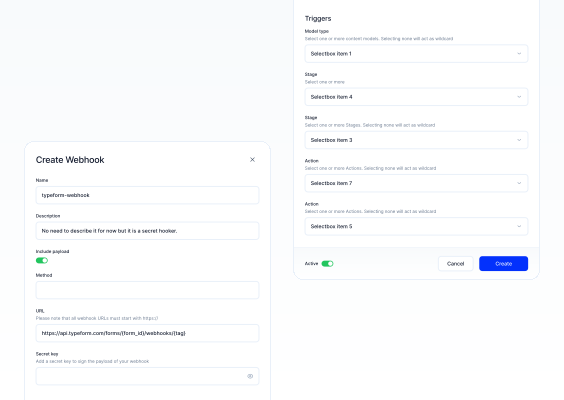
Navigate to Project Settings > Webhooks and click Add Webhook to begin configuration. The creation form is divided into three sections: setup, security, and trigger configuration.
1. Webhook Setup
Name: Assign a unique name to your webhook within a 1-30 character range. Do not use special characters, with the exception of hyphens (
-) and underscores (_). Choose a descriptive name that reflects the webhook's purpose (e.g.,deploy-productionorslack-notifications).Description (Optional): Provide a short description that outlines the webhook's purpose and functionality. This helps team members understand what the webhook does at a glance.
URL: Enter the endpoint URL where the webhook will send the HTTP request. The URL must start with
https://for secure communication. This is the address of the service that will receive and process the webhook payload.HTTP Method: Select the HTTP method that the webhook should use when triggering. Contentrain supports the following methods:
- POST -- the most common choice. Sends the payload in the request body. Use this for most integrations.
- GET -- sends data as query parameters. Useful for simple trigger endpoints that do not need a request body.
- PUT -- sends the payload in the request body. Use when the receiving service expects a PUT for update operations.
- DELETE -- use when the receiving service expects a DELETE method for removal-related workflows.
2. Security and Data Handling
Secret Key (Optional): Add a secret key to sign the webhook payload. When a secret key is configured, Contentrain includes a signature header (
X-Contentrain-Signature) with each request. The signature is an HMAC-SHA256 hash of the request body using your secret key. This allows your endpoint to verify that incoming requests are genuinely from Contentrain and have not been tampered with.To validate the signature on your server:
javascriptimport crypto from "crypto"; function verifyWebhookSignature(payload, signature, secret) { const expectedSignature = crypto .createHmac("sha256", secret) .update(payload) .digest("hex"); return crypto.timingSafeEqual( Buffer.from(signature), Buffer.from(expectedSignature) ); } // In your request handler: const payload = req.body; // raw request body as string const signature = req.headers["x-contentrain-signature"]; const isValid = verifyWebhookSignature(payload, signature, "your-secret-key"); if (!isValid) { return res.status(401).send("Invalid signature"); }Include Payload: Toggle this option to include the event's metadata along with the webhook trigger. When enabled, the request body contains detailed information about the content change, including the affected model, entry data, and action performed. When disabled, only a minimal notification is sent, which can be useful for simple trigger-based workflows where the receiving service does not need the full content data.
3. Trigger Configuration
Model Type: Choose which content models trigger the webhook. You can select one or more specific models from the dropdown. If no model is specifically selected, the webhook will act globally across all models. For example, you might configure a webhook that only fires when
blog-postscontent changes, while ignoring changes to other models.Stages: Specify which content stages should trigger the webhook:
- Draft -- fires when content is saved as a draft.
- Publish -- fires when content is published.
You can select one or both stages depending on your workflow needs. For production deployment triggers, you typically only want the Publish stage. For editorial notification workflows, you may want both stages.
Actions: Select the types of actions that will initiate the webhook:
- Create -- fires when a new content entry is created.
- Update -- fires when an existing content entry is modified.
- Delete -- fires when a content entry is removed.
- Publish -- fires when a content entry's status changes to published.
- Unpublish -- fires when a published content entry is reverted to draft.
You can combine multiple actions. For example, a cache invalidation webhook should listen to Update, Delete, Publish, and Unpublish actions, while a notification webhook might only listen to Publish.
Activation
After creating a webhook, you can enable or disable it at any time from the webhooks list.
- Active -- the webhook is operational and will fire on matching events.
- Inactive -- the webhook is paused and will not fire, regardless of events. The configuration is preserved so you can re-enable it later.
Toggle the activation status by clicking the switch next to the webhook in the list. This is useful for temporarily disabling a webhook during maintenance windows or while debugging your endpoint without deleting the webhook configuration.
Webhook Payload Format
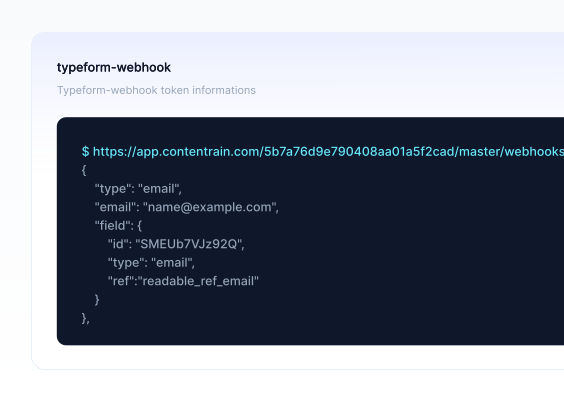
When Include Payload is enabled and the HTTP method supports a request body (POST, PUT), Contentrain sends a JSON payload with the following structure:
{
  "event": "content.publish.create",
  "timestamp": "2025-03-15T14:32:10.000Z",
  "project": {
    "id": "your-project-id",
    "name": "Your Project Name"
  },
  "model": {
    "id": "blog-posts",
    "name": "Blog Posts"
  },
  "entry": {
    "ID": "a1b2c3d4e5f6",
    "title": "Getting Started with Contentrain",
    "slug": "getting-started-with-contentrain",
    "status": "publish",
    "createdAt": "2025-03-15T14:30:00.000Z",
    "updatedAt": "2025-03-15T14:32:10.000Z"
  },
  "action": "create",
  "stage": "publish"
}
Payload fields explained:
| Field | Description |
|---|---|
event | A dot-separated string describing the event: content.<stage>.<action> |
timestamp | ISO 8601 timestamp of when the event occurred |
project.id | The unique identifier of your Contentrain project |
project.name | The name of your Contentrain project |
model.id | The identifier of the content model that triggered the event |
model.name | The display name of the content model |
entry | The content entry data, including all fields from the model. For delete actions, this contains the entry as it was before deletion |
action | The action that triggered the webhook: create, update, or delete |
stage | The content stage: draft or publish |
Request headers sent with every webhook call:
| Header | Description |
|---|---|
Content-Type | application/json |
X-Contentrain-Event | The event name (e.g., content.publish.create) |
X-Contentrain-Signature | HMAC-SHA256 signature of the payload (only if a secret key is configured) |
User-Agent | Contentrain-Webhook/1.0 |
Testing Webhooks
Before relying on a webhook in production, verify that it works correctly.
Using a Request Inspection Tool
Use a service like webhook.site or RequestBin to inspect incoming webhook requests:
- Go to webhook.site and copy the unique URL provided.
- Create a webhook in Contentrain using that URL as the endpoint.
- Enable Include Payload and set the method to POST.
- Perform an action that matches the trigger configuration (e.g., create or update a content entry).
- Return to webhook.site and inspect the received request, including headers, body, and timing.
Verifying Your Own Endpoint
When testing against your own server:
Check the response code. Contentrain considers HTTP status codes in the 2xx range as successful delivery. Return a
200 OKas quickly as possible. If your processing is long-running, accept the webhook and process asynchronously.Log incoming requests. Add temporary logging to your endpoint to capture the full request headers and body:
javascriptapp.post("/webhooks/contentrain", (req, res) => { console.log("Headers:", JSON.stringify(req.headers, null, 2)); console.log("Body:", JSON.stringify(req.body, null, 2)); // Respond quickly res.status(200).send("OK"); // Process asynchronously processWebhook(req.body); });Test each action type. Create, update, and delete a content entry to confirm your endpoint handles all three correctly.
Simulate failures. Temporarily return a 500 error from your endpoint to observe how Contentrain handles delivery failures.
Local Development
For testing webhooks during local development, use a tunneling tool to expose your local server to the internet:
- ngrok:
ngrok http 3000creates a public URL that forwards tolocalhost:3000. - Cloudflare Tunnel:
cloudflared tunnel --url http://localhost:3000provides a similar capability.
Use the generated public URL as the webhook endpoint in Contentrain.
Use Cases
Static Site Rebuilds
Trigger a rebuild of your static site whenever content is published. This is the most common webhook use case for JAMstack architectures.
// Example: Trigger a Vercel deployment
app.post("/webhooks/contentrain", (req, res) => {
  res.status(200).send("OK");

  fetch("https://api.vercel.com/v1/integrations/deploy/your-deploy-hook", {
    method: "POST",
  });
});
For platforms like Netlify, Vercel, or Cloudflare Pages, you can often use the platform's deploy hook URL directly as the webhook endpoint, with the GET or POST method and no payload needed.
CI/CD Pipeline Triggers
Kick off a CI/CD pipeline when content changes, for example to run tests or validation against updated content:
// Example: Trigger a GitHub Actions workflow
app.post("/webhooks/contentrain", async (req, res) => {
  res.status(200).send("OK");

  await fetch(
    "https://api.github.com/repos/owner/repo/dispatches",
    {
      method: "POST",
      headers: {
        Authorization: "Bearer YOUR_GITHUB_TOKEN",
        "Content-Type": "application/json",
      },
      body: JSON.stringify({
        event_type: "contentrain_update",
        client_payload: {
          model: req.body.model.id,
          action: req.body.action,
        },
      }),
    }
  );
});
Cache Invalidation
Purge cached content when entries are updated or deleted:
app.post("/webhooks/contentrain", async (req, res) => {
  res.status(200).send("OK");

  const { model, entry, action } = req.body;

  if (action === "delete" || action === "update") {
    await fetch(`https://api.cloudflare.com/client/v4/zones/ZONE_ID/purge_cache`, {
      method: "POST",
      headers: {
        Authorization: "Bearer CF_API_TOKEN",
        "Content-Type": "application/json",
      },
      body: JSON.stringify({
        files: [`https://yoursite.com/${model.id}/${entry.slug}`],
      }),
    });
  }
});
Notifications
Send a Slack message when new content is published:
app.post("/webhooks/contentrain", async (req, res) => {
  res.status(200).send("OK");

  const { model, entry, action, stage } = req.body;

  if (stage === "publish" && action === "create") {
    await fetch("https://hooks.slack.com/services/YOUR/SLACK/WEBHOOK", {
      method: "POST",
      headers: { "Content-Type": "application/json" },
      body: JSON.stringify({
        text: `New ${model.name} published: "${entry.title}" by the content team.`,
      }),
    });
  }
});
Search Index Updates
Keep an external search index (e.g., Algolia, Meilisearch) synchronized with your content:
app.post("/webhooks/contentrain", async (req, res) => {
  res.status(200).send("OK");

  const { entry, action, model } = req.body;
  const indexName = model.id;

  if (action === "create" || action === "update") {
    await searchClient.saveObject(indexName, {
      objectID: entry.ID,
      ...entry,
    });
  } else if (action === "delete") {
    await searchClient.deleteObject(indexName, entry.ID);
  }
});
Troubleshooting
Webhook is not firing
- Check activation status. Confirm the webhook is set to Active in the webhooks list.
- Verify trigger configuration. Ensure the correct model, stage, and action are selected. If you selected a specific model, the webhook will not fire for other models.
- Confirm the action matches. Creating a draft entry only triggers webhooks configured for the Draft stage with the Create action.
Endpoint returns errors
- Verify the URL is reachable. Ensure the endpoint URL is publicly accessible and not blocked by a firewall. Contentrain's servers must be able to reach it.
- Check HTTPS. Webhook URLs must use
https://. Self-signed certificates may cause delivery failures. - Review server logs. Check your endpoint's logs for incoming request details and any errors thrown during processing.
- Return 200 quickly. If your endpoint takes too long to respond, the request may time out. Accept the webhook immediately and process the data asynchronously.
Signature validation fails
- Use the raw request body. The HMAC signature is computed over the raw request body string, not a parsed and re-serialized JSON object. Make sure your framework gives you access to the raw body.
- Check the secret key. Confirm the secret key in your validation code exactly matches the one configured in Contentrain, including any leading or trailing whitespace.
- Use constant-time comparison. Always use
crypto.timingSafeEqual()or an equivalent function to compare signatures, preventing timing attacks.
Payload is empty
- Enable Include Payload. If the request body is empty, check that the Include Payload toggle is enabled in the webhook configuration.
- Use POST or PUT method. GET and DELETE methods typically do not carry a request body. Switch to POST if you need payload data.
Duplicate events
- Implement idempotency. Your endpoint may occasionally receive the same event more than once. Use the
entry.IDandtimestampfields to detect and discard duplicates. - Check for multiple webhooks. Verify you do not have multiple webhooks configured for the same triggers pointing to the same endpoint.
Delivery Details
Retry Behavior
Contentrain attempts to deliver each webhook once. There is no automatic retry on failure. If your endpoint is temporarily unavailable, the webhook event will be missed. Design your system to handle this:
- Implement a periodic sync mechanism as a fallback alongside webhooks.
- Monitor your webhook logs (see below) to detect missed deliveries.
Webhook Logs
Contentrain records a log entry for every webhook delivery attempt. You can view logs for each webhook from the webhook detail screen. Each log entry includes:
| Field | Description |
|---|---|
| Status | The HTTP status code returned by your endpoint. |
| Response time | Round-trip time in milliseconds. |
| Payload | The request body that was sent. |
| Response | The response body returned by your endpoint. |
| Model | The content model that triggered the webhook. |
| Action | The action that triggered the webhook (create, update, delete, publish, unpublish). |
Log Retention
Webhook logs are retained for 7 days. Logs older than 7 days are automatically deleted daily. If you need longer retention, export or forward logs to your own monitoring system.
Duplicate Webhook
You can quickly create a copy of an existing webhook by using the Duplicate option from the webhook list. This clones all configuration including the URL, method, secret key, models, stages, and actions. You can then modify the copy as needed.